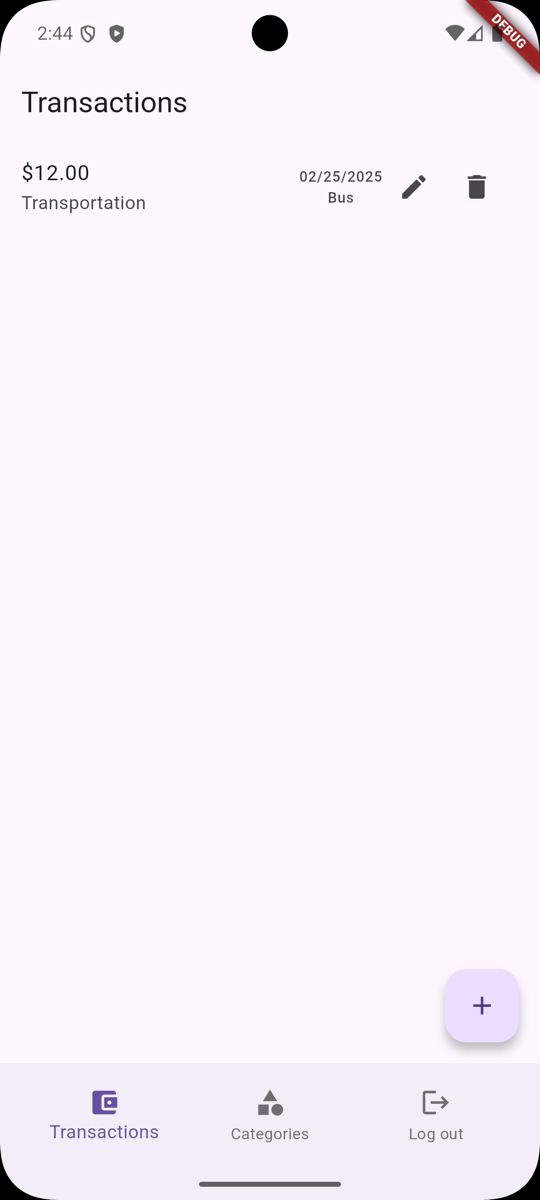
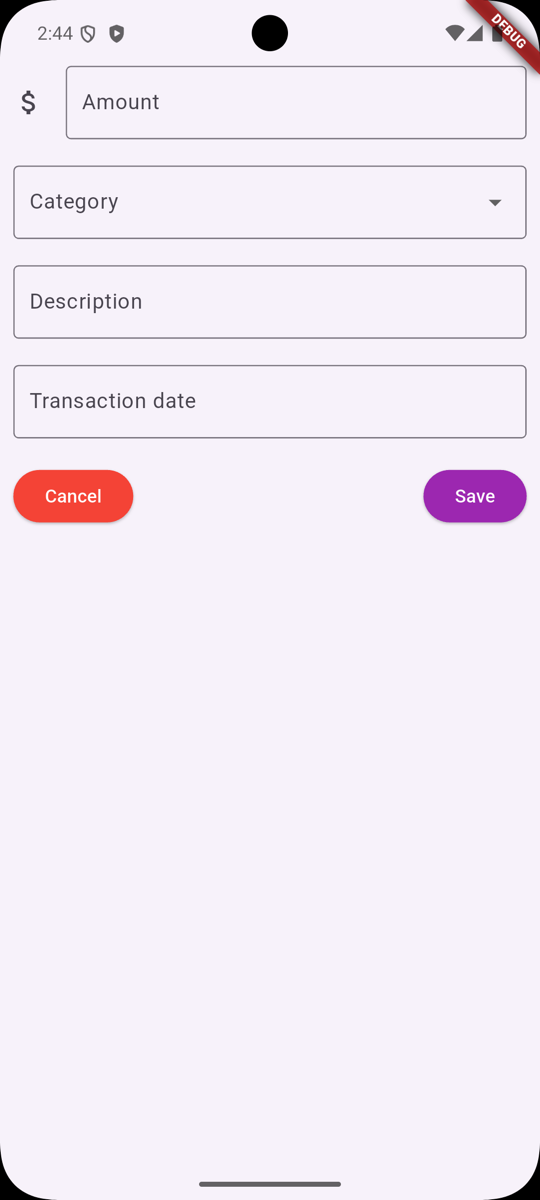
In this lesson, we will apply all the things we have learned in the previous lesson and build a Transactions CRUD screen:
Creating a Model
Let's start by creating our new Transaction Model to match our Laravel Model and Database fields:
lib/models/transaction.dart
class Transaction { int id; int categoryId; String categoryName; String description; String amount; String transactionDate; String createdAt; Transaction( {required this.id, required this.categoryId, required this.categoryName, required this.description, required this.amount, required this.transactionDate, required this.createdAt}); factory Transaction.fromJson(Map<String, dynamic> json) { return Transaction( id: json['id'], categoryId: json['category_id'], categoryName: json['category_name'], description: json['description'], amount: json['amount'], transactionDate: json['transaction_date'], createdAt: json['created_at'], ); }}Adding API Functions
Next, we need to add a few functions to our API Service:
lib/services/api.dart
import 'package:laravel_api_flutter_app/models/transaction.dart'; // ... Future<List<Transaction>> fetchTransactions() async { http.Response response = await http.get( Uri.parse(baseUrl + '/api/transactions'), headers: { 'Accept': 'application/json', 'Content-Type': 'application/json', 'Authorization': 'Bearer $token' }, ); final Map<String, dynamic> data = json.decode(response.body); if (!data.containsKey('data') || data['data'] is! List) { throw Exception('Failed to load categories'); } List transactions = data['data']; return transactions .map((transaction) => Transaction.fromJson(transaction)) .toList();} Future<Transaction> addTransaction( String amount, String category, String description, String date) async { String uri = baseUrl + '/api/transactions'; http.Response response = await http.post(Uri.parse(uri), headers: { 'Accept': 'application/json', 'Content-Type': 'application/json', 'Authorization': 'Bearer $token' }, body: jsonEncode({ 'amount': amount, 'category_id': category, 'description': description, 'transaction_date': date })); if (response.statusCode != 201) { throw Exception('Error happened on create'); } return Transaction.fromJson(jsonDecode(response.body)['data']);} Future<Transaction> updateTransaction(Transaction transaction) async { String uri = baseUrl + '/api/transactions/' + transaction.id.toString(); http.Response response = await http.put(Uri.parse(uri), headers: { 'Accept': 'application/json', 'Content-Type': 'application/json', 'Authorization': 'Bearer $token' }, body: jsonEncode({ 'amount': transaction.amount, 'category_id': transaction.categoryId, 'description': transaction.description, 'transaction_date': transaction.transactionDate })); if (response.statusCode != 200) { print(response.body); throw Exception('Error happened on update'); } return Transaction.fromJson(jsonDecode(response.body)['data']);} Future<void> deleteTransaction(id) async { String uri = baseUrl + '/api/transactions/' + id.toString(); http.Response response = await http.delete( Uri.parse(uri), headers: { 'Accept': 'application/json', 'Content-Type': 'application/json', 'Authorization': 'Bearer $token' }, ); if (response.statusCode != 204) { throw Exception('Error happened on delete'); }}Creating Transaction Provider
Once we have our API functions, we can work on creating a Provider:
lib/providers/transaction_provider.dart
import 'package:flutter/material.dart';import 'package:laravel_api_flutter_app/models/transaction.dart';import 'package:laravel_api_flutter_app/providers/auth_provider.dart';import 'package:laravel_api_flutter_app/services/api.dart'; class TransactionProvider extends ChangeNotifier { List<Transaction> transactions = []; late ApiService apiService; late AuthProvider authProvider; TransactionProvider(AuthProvider authProvider) { this.authProvider = authProvider; init(); } Future init() async { this.apiService = ApiService(await authProvider.getToken()); transactions = await apiService.fetchTransactions(); notifyListeners(); } Future<void> addTransaction( String amount, String category, String description, String date) async { try { Transaction addedTransaction = await apiService.addTransaction(amount, category, description, date); transactions.add(addedTransaction); notifyListeners(); } catch (e) { print(e); } } Future<void> updateTransaction(Transaction transaction) async { try { Transaction updatedTransaction = await apiService.updateTransaction(transaction); int index = transactions.indexOf(transaction); transactions[index] = updatedTransaction; notifyListeners(); } catch (e) { print(e); } } Future<void> deleteTransaction(Transaction transaction) async { try { await apiService.deleteTransaction(transaction.id); transactions.remove(transaction); notifyListeners(); } catch (e) { print(e); } }}Installing Flutter Package
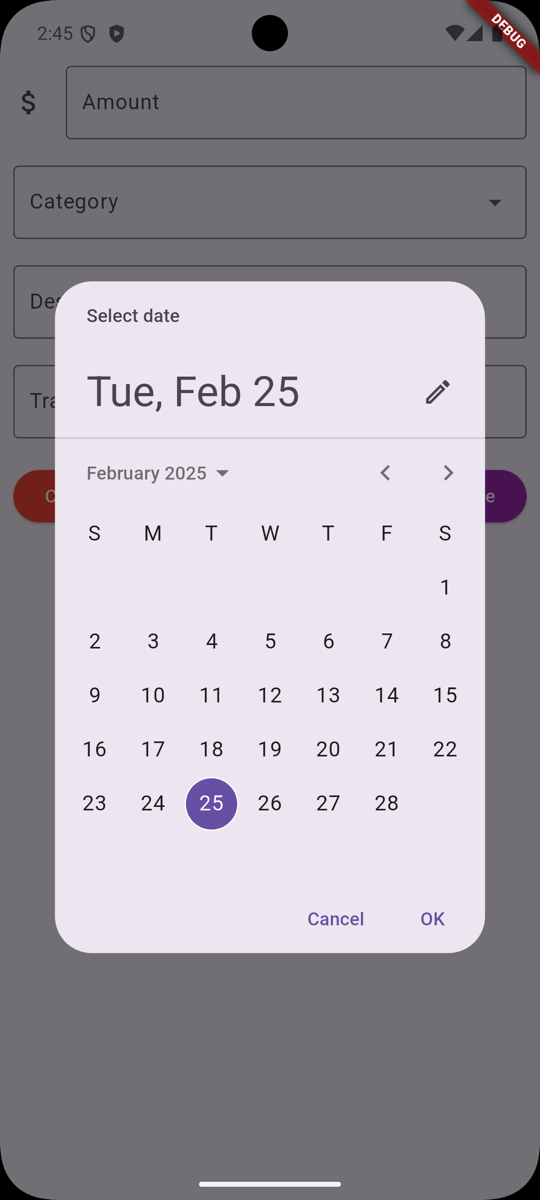
We are getting close to creating our interface. Let's install a package that will help us with the date picker:
flutter pub add intlThis package will help us format the date in a way that is easy to read, just like Carbon would in Laravel.
Creating Transactions List
We need to display a List of Transactions. We've taken our Categories List and modified it to display Transactions:
lib/screens/transactions/list.dart
import 'package:flutter/material.dart';import 'package:laravel_api_flutter_app/models/transaction.dart';import 'package:laravel_api_flutter_app/widgets/transaction_add.dart';import 'package:laravel_api_flutter_app/widgets/transaction_edit.dart';import 'package:provider/provider.dart';import 'package:laravel_api_flutter_app/providers/transaction_provider.dart'; class Transactions extends StatefulWidget { @override _TransactionsState createState() => _TransactionsState();} class _TransactionsState extends State<Transactions> { @override Widget build(BuildContext context) { final provider = Provider.of<TransactionProvider>(context); List<Transaction> transactions = provider.transactions; return Scaffold( appBar: AppBar( title: Text('Transactions'), ), body: ListView.builder( itemCount: transactions.length, itemBuilder: (context, index) { Transaction transaction = transactions[index]; return ListTile( title: Text('\$' + transaction.amount), subtitle: Text(transaction.categoryName), trailing: Row(mainAxisSize: MainAxisSize.min, children: <Widget>[ Column(mainAxisAlignment: MainAxisAlignment.center, children: [ Text(transaction.transactionDate), Text(transaction.description), ]), IconButton( icon: Icon(Icons.edit), onPressed: () { showModalBottomSheet( isScrollControlled: true, context: context, builder: (BuildContext context) { return TransactionEdit( transaction, provider.updateTransaction); }); }, ), IconButton( icon: Icon(Icons.delete), onPressed: () { showDialog( context: context, builder: (BuildContext context) { return AlertDialog( title: Text("Confirmation"), content: Text("Are you sure you want to delete?"), actions: [ TextButton( child: Text("Cancel"), onPressed: () => Navigator.pop(context), ), TextButton( child: Text("Delete"), onPressed: () => deleteTransaction( provider.deleteTransaction, transaction, context)), ], ); }); }, ) ]), ); }, ), floatingActionButton: new FloatingActionButton( onPressed: () { showModalBottomSheet( isScrollControlled: true, context: context, builder: (BuildContext context) { return TransactionAdd(provider.addTransaction); }); }, child: Icon(Icons.add)), ); } Future deleteTransaction(Function callback, Transaction transaction, context) async { await callback(transaction); Navigator.pop(context); }}Creating Add Transaction Screen
Then we have to do the same for our Transaction Add screen:
lib/widgets/transaction_add.dart
import 'package:flutter/material.dart';import 'package:flutter/services.dart';import 'package:intl/intl.dart';import 'package:laravel_api_flutter_app/models/category.dart';import 'package:provider/provider.dart';import 'package:laravel_api_flutter_app/providers/category_provider.dart'; class TransactionAdd extends StatefulWidget { final Function transactionCallback; TransactionAdd(this.transactionCallback, {Key? key}) : super(key: key); @override _TransactionAddState createState() => _TransactionAddState();} class _TransactionAddState extends State<TransactionAdd> { final GlobalKey<FormState> _formKey = GlobalKey<FormState>(); final transactionAmountController = TextEditingController(); final transactionCategoryController = TextEditingController(); final transactionDescriptionController = TextEditingController(); final transactionDateController = TextEditingController(); String errorMessage = ''; @override Widget build(BuildContext context) { return Padding( padding: EdgeInsets.only(top: 50, left: 10, right: 10), child: Form( key: _formKey, child: Column(children: <Widget>[ TextFormField( controller: transactionAmountController, inputFormatters: [ FilteringTextInputFormatter.allow( RegExp(r'^-?(\d+\.?\d{0,2})?')), ], keyboardType: TextInputType.numberWithOptions( signed: true, decimal: true), decoration: InputDecoration( border: OutlineInputBorder(), labelText: 'Amount', icon: Icon(Icons.attach_money), hintText: '0', ), validator: (value) { if (value!.trim().isEmpty) { return 'Amount is required'; } final newValue = double.tryParse(value); if (newValue == null) { return 'Invalid amount format'; } }, onChanged: (text) => setState(() => errorMessage = ''), ), SizedBox(height: 20), // Acts as a spacer buildCategoriesDropdown(), SizedBox(height: 20), // Acts as a spacer TextFormField( controller: transactionDescriptionController, decoration: InputDecoration( border: OutlineInputBorder(), labelText: 'Description', ), validator: (value) { if (value!.trim().isEmpty) { return 'Description is required'; } return null; }, onChanged: (text) => setState(() => errorMessage = ''), ), SizedBox(height: 20), // Acts as a spacer TextFormField( controller: transactionDateController, onTap: () { selectDate(context); }, decoration: InputDecoration( border: OutlineInputBorder(), labelText: 'Transaction date', ), validator: (value) { if (value!.trim().isEmpty) { return 'Date is required'; } return null; }, onChanged: (text) => setState(() => errorMessage = ''), ), SizedBox(height: 20), // Acts as a spacer Row( mainAxisAlignment: MainAxisAlignment.spaceBetween, children: <Widget>[ ElevatedButton( style: ElevatedButton.styleFrom(backgroundColor: Colors.red, foregroundColor: Colors.white), child: Text('Cancel'), onPressed: () => Navigator.pop(context), ), ElevatedButton( child: Text('Save'), onPressed: () => saveTransaction(context), style: ElevatedButton.styleFrom( backgroundColor: Colors.purple, foregroundColor: Colors.white ), ), ]), Text(errorMessage, style: TextStyle(color: Colors.red)) ]))); } Future selectDate(BuildContext context) async { final DateTime? picked = await showDatePicker( context: context, initialDate: DateTime.now(), firstDate: DateTime(DateTime.now().year - 5), lastDate: DateTime(DateTime.now().year + 5)); if (picked != null) setState(() { transactionDateController.text = DateFormat('MM/dd/yyyy').format(picked); }); } Widget buildCategoriesDropdown() { return Consumer<CategoryProvider>( builder: (context, cProvider, child) { List<Category> categories = cProvider.categories; return DropdownButtonFormField( elevation: 8, items: categories.map<DropdownMenuItem<String>>((e) { return DropdownMenuItem<String>( value: e.id.toString(), child: Text(e.name, style: TextStyle(color: Colors.black, fontSize: 20.0))); }).toList(), onChanged: (String? newValue) { if (newValue == null) { return; } setState(() { transactionCategoryController.text = newValue.toString(); }); }, decoration: InputDecoration( border: OutlineInputBorder(), labelText: 'Category', ), dropdownColor: Colors.white, validator: (value) { if (value == null) { return 'Please select category'; } }, ); }, ); } Future saveTransaction(context) async { final form = _formKey.currentState; if (!form!.validate()) { return; } await widget.transactionCallback( transactionAmountController.text, transactionCategoryController.text, transactionDescriptionController.text, transactionDateController.text); Navigator.pop(context); }}Creating Edit Transaction Screen
And for our Edit screen:
lib/widgets/transaction_edit.dart
import 'package:flutter/material.dart';import 'package:flutter/services.dart';import 'package:intl/intl.dart';import 'package:laravel_api_flutter_app/models/category.dart';import 'package:laravel_api_flutter_app/models/transaction.dart';import 'package:provider/provider.dart';import 'package:laravel_api_flutter_app/providers/category_provider.dart'; class TransactionEdit extends StatefulWidget { final Transaction transaction; final Function transactionCallback; TransactionEdit(this.transaction, this.transactionCallback, {Key? key}) : super(key: key); @override _TransactionEditState createState() => _TransactionEditState();} class _TransactionEditState extends State<TransactionEdit> { final GlobalKey<FormState> _formKey = GlobalKey<FormState>(); final transactionAmountController = TextEditingController(); final transactionCategoryController = TextEditingController(); final transactionDescriptionController = TextEditingController(); final transactionDateController = TextEditingController(); String errorMessage = ''; @override void initState() { transactionAmountController.text = widget.transaction.amount.toString(); transactionCategoryController.text = widget.transaction.categoryId.toString(); transactionDescriptionController.text = widget.transaction.description.toString(); transactionDateController.text = widget.transaction.transactionDate.toString(); super.initState(); } @override Widget build(BuildContext context) { return Padding( padding: EdgeInsets.only(top: 50, left: 10, right: 10), child: Form( key: _formKey, child: Column(children: <Widget>[ TextFormField( controller: transactionAmountController, inputFormatters: [ FilteringTextInputFormatter.allow( RegExp(r'^-?(\d+\.?\d{0,2})?')), ], keyboardType: TextInputType.numberWithOptions( signed: true, decimal: true), decoration: InputDecoration( border: OutlineInputBorder(), labelText: 'Amount', icon: Icon(Icons.attach_money), hintText: '0', ), validator: (value) { if (value!.trim().isEmpty) { return 'Amount is required'; } final newValue = double.tryParse(value); if (newValue == null) { return 'Invalid amount format'; } }, onChanged: (text) => setState(() => errorMessage = ''), ), SizedBox(height: 20), // Acts as a spacer buildCategoriesDropdown(), SizedBox(height: 20), // Acts as a spacer TextFormField( controller: transactionDescriptionController, decoration: InputDecoration( border: OutlineInputBorder(), labelText: 'Description', ), validator: (value) { if (value!.trim().isEmpty) { return 'Description is required'; } return null; }, onChanged: (text) => setState(() => errorMessage = ''), ), SizedBox(height: 20), // Acts as a spacer TextFormField( controller: transactionDateController, onTap: () { selectDate(context); }, decoration: InputDecoration( border: OutlineInputBorder(), labelText: 'Transaction date', ), validator: (value) { if (value!.trim().isEmpty) { return 'Date is required'; } return null; }, onChanged: (text) => setState(() => errorMessage = ''), ), SizedBox(height: 20), // Acts as a spacer Row( mainAxisAlignment: MainAxisAlignment.spaceBetween, children: <Widget>[ ElevatedButton( style: ElevatedButton.styleFrom( backgroundColor: Colors.red, foregroundColor: Colors.white), child: Text('Cancel'), onPressed: () => Navigator.pop(context), ), ElevatedButton( child: Text('Save'), onPressed: () => saveTransaction(context), style: ElevatedButton.styleFrom( backgroundColor: Colors.purple, foregroundColor: Colors.white), ), ]), Text(errorMessage, style: TextStyle(color: Colors.red)) ]))); } Future selectDate(BuildContext context) async { final DateTime? picked = await showDatePicker( context: context, initialDate: DateTime.now(), firstDate: DateTime(DateTime.now().year - 5), lastDate: DateTime(DateTime.now().year + 5)); if (picked != null) setState(() { transactionDateController.text = DateFormat('MM/dd/yyyy').format(picked); }); } Widget buildCategoriesDropdown() { return Consumer<CategoryProvider>( builder: (context, cProvider, child) { List<Category> categories = cProvider.categories; return DropdownButtonFormField( elevation: 8, items: categories.map<DropdownMenuItem<String>>((e) { return DropdownMenuItem<String>( value: e.id.toString(), child: Text(e.name, style: TextStyle(color: Colors.black, fontSize: 20.0))); }).toList(), value: transactionCategoryController.text, onChanged: (String? newValue) { if (newValue == null) { return; } setState(() { transactionCategoryController.text = newValue.toString(); }); }, decoration: InputDecoration( border: OutlineInputBorder(), labelText: 'Category', ), dropdownColor: Colors.white, validator: (value) { if (value == null) { return 'Please select category'; } }, ); }, ); } Future saveTransaction(context) async { final form = _formKey.currentState; if (!form!.validate()) { return; } widget.transaction.amount = transactionAmountController.text; widget.transaction.categoryId = int.parse(transactionCategoryController.text); widget.transaction.description = transactionDescriptionController.text; widget.transaction.transactionDate = transactionDateController.text; await widget.transactionCallback(widget.transaction); Navigator.pop(context); }}Registering Transaction Provider
Once we have all the Screens and Widgets done, we need to register our Transaction Provider:
lib/main.dart
import 'package:flutter/material.dart';import 'package:laravel_api_flutter_app/Screens/Auth/Login.dart';import 'package:laravel_api_flutter_app/Screens/Auth/Register.dart';import 'package:laravel_api_flutter_app/screens/categories/categories_list.dart';import 'package:laravel_api_flutter_app/providers/transaction_provider.dart';import 'package:laravel_api_flutter_app/providers/category_provider.dart';import 'package:provider/provider.dart';import 'package:laravel_api_flutter_app/screens/home.dart';import 'package:laravel_api_flutter_app/providers/auth_provider.dart'; void main() { runApp(MyApp());} class MyApp extends StatelessWidget { const MyApp({super.key}); @override Widget build(BuildContext context) { return ChangeNotifierProvider( create: (context) => AuthProvider(), child: Consumer<AuthProvider>(builder: (context, authProvider, child) { return MultiProvider( providers: [ ChangeNotifierProvider<CategoryProvider>( create: (context) => CategoryProvider(authProvider)), ChangeNotifierProvider<TransactionProvider>( create: (context) => TransactionProvider(authProvider)), ], child: MaterialApp(title: 'Welcome to Flutter', routes: { '/': (context) { final authProvider = Provider.of<AuthProvider>(context); return authProvider.isAuthenticated ? Home() : Login(); }, '/login': (context) => Login(), '/register': (context) => Register(), '/home': (context) => Home(), '/categories': (context) => CategoriesList(), })); })); }}That's it! We have created a full CRUD for Transactions.
Fixing Token Issue
If we run the project now, we will get an error about our Token being String?:
lib/providers/transaction_provider.dart:17:34: Error: The argument type 'String?' can't be assigned to the parameter type 'String' because 'String?' is nullable and 'String' isn't. this.apiService = ApiService(await authProvider.getToken());So let's do some quick fixes to our getToken function:
lib/providers/auth_provider.dart
Future<String?> getToken() { Future<String?> token = storage.read(key: 'token'); if (token != null) { return Future.value(token); } return Future.value('');} Future<String> getToken() async { try { String? token = await storage.read(key: 'token'); if (token != null) { return token ?? ''; } return ''; } catch (e) { return ''; }} Future<String?> setToken(String token) async {Future<String> setToken(String token) async { await storage.write(key: 'token', value: token); return token;}We are simply changing the return type of the getToken function to Future<String> and returning an empty string if the token is not found. This will still fail our Sanctum middleware.
Now let's start our application again and test our Transactions CRUD:
Every CRUD action should now work as expected.
We will run Flutter checks in the next lesson to fix some code issues.
Check out the GitHub Commit for this lesson.